

Microsoft Power Automate Saudi Workflow Foundation
Microsoft Power Automate Invoicing Flow
- Business Event Capture: Capture business events from connected applications and initiate electronic invoicing actions through Power Automate flows.
- Invoice Information Gathering: Collect relevant customer, transaction, tax, and reference information before constructing structured Saudi electronic invoice documents.
- Invoice Content Creation: Transform gathered business information into organized invoice content using connected Advintek processing workflows efficiently.
- Rule Based Validation: Apply configured business rules and validation checks before electronic documents proceed through Saudi invoicing processes.
- Document Status Exchange: Exchange document status information with connected applications so teams can monitor workflow progress across applications.
- Financial Record Association: Associate completed documents with originating records for reconciliation, reporting, and subsequent finance administration consistently thereafter.
Advintek Extends Microsoft Power Automate Workflows
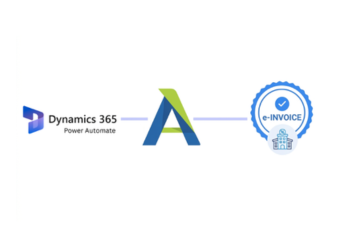
Advintek adds specialized e-invoicing capabilities to Microsoft Power Automate, allowing automated business processes to connect with Saudi Arabia document requirements.
- Automates invoice actions across applications
- Connects Microsoft workflows with e-invoicing
- Supports Saudi electronic document processing
- Routes exceptions through defined workflows
Microsoft Power Automate Process Automation
- Automated Invoice Handoffs: Automate invoice handoffs between finance applications and specialized Saudi Araiba electronic invoicing services through flows.
- Coordinated Approval Events: Coordinate approval events with invoice processing so required business checks occur before document submission.
- Managed Exception Routing: Manage workflow exceptions by directing incomplete or rejected transactions toward appropriate operational review promptly.
- Connected Application Data: Connect customer and transaction information across applications while preserving relevant source record relationships securely.
- Synchronized Invoice Outcomes: Support finance automation by synchronizing invoice outcomes with connected accounting and operational systems automatically.
- Governed Invoice Workflows: Govern recurring invoicing workflows through defined triggers, actions, conditions, and controlled process paths consistently.
Microsoft Power Automate Saudi Workflow Intelligence
Run Performance Insights
Review completed automation runs to identify recurring workflow bottlenecks and processing exceptions.
Application Distribution Analysis
Examine invoice activity across connected applications to understand operational workload distribution.
Exception Pattern Review
Analyze recurring document issues to improve workflow configuration and downstream processing.
Microsoft Power Automate Saudi Arabia Business Reach
Microsoft Power Automate can coordinate finance, sales, service, and administrative applications while Advintek provides the specialized Saudi Arabia electronic invoicing layer.
- Connects Microsoft applications with invoice services
- Automates finance-related document workflows
- Coordinates information between business systems
- Extends automation into Saudi e-invoicing
Start Power Automate Saudi Flows
Connect Microsoft Power Automate with Advintek for Saudi e-invoicing.
Start connected Saudi invoice workflows across applications.
Ready e-Invoice System
Frequently Asked Questions Power Automate e-Invoicing Saudi Arabia
How can Microsoft Power Automate coordinate Saudi e-invoicing workflows?
Microsoft Power Automate can coordinate events across connected business applications and initiate electronic invoicing actions when configured conditions are met. Advintek can receive the relevant information, structure it for Saudi electronic invoicing, and return processing information through connected workflows. This allows automation to operate across finance, sales, and administrative systems.
Can Microsoft Power Automate connect multiple business applications for invoicing?
Microsoft Power Automate can connect information from Microsoft applications and other business systems into an integrated invoicing workflow. Customer, transaction, tax, and reference information can be gathered through configured flows before Advintek processes the applicable electronic document. This reduces disconnected handoffs while allowing source applications to remain responsible for their business records.
Can approval stages be included before electronic invoice processing?
Approvals can be incorporated into Microsoft Power Automate flows before invoice information reaches the electronic document processing stage. Configured conditions can direct transactions through required business checks, while exceptions can follow separate workflow paths. Advintek then handles the specialized electronic invoicing process, creating a clearer separation between internal approval automation and document processing.
How are invoice outcomes synchronized with connected systems?
Microsoft Power Automate can connect invoice outcomes with originating records through configured workflow actions. Processing information can be passed to relevant finance or operational applications, allowing teams to identify completed, rejected, or exceptional transactions. This creates a connected record trail across the automation environment while preserving the source information maintained by participating business systems.
What business processes can Microsoft Power Automate automate around e-invoicing?
Microsoft Power Automate can automate recurring invoice-related processes across finance, sales, customer service, and other connected applications. Advintek provides the specialized electronic invoicing layer, while Power Automate coordinates the surrounding business actions. This architecture can help organizations connect existing Microsoft workflows with Saudi invoicing requirements without redesigning every underlying business application.